Coordinate System#
For any IMU based application it is important that the Coordinate system (definition and orientation) is clearly defined. Otherwise, algorithms might use the wrong axis or defined calculations might not work at all (believe us, it happened to us too, … more than once). Therefore, before using any algorithm in mobgap, make sure that the coordinate system of your data matches our expectations.
In general, we differentiate between 4 different coordinate systems:
The IMU sensor frame, defined by the axis x, y, z of the sensor. This coordinate system moves with the sensor.
The body frame, defined by the axis IS (inferior-superior), PA (posterior-anterior), ML (medial-lateral) and moves with the body/sensor.
The “normal” global frame, defined by the axis gx, gy, gz that is defined globally* and does not move with the sensor. (* the initial orientation is defined by the first sample of the data)
The body-aligned global frame, defined by the axis GIS, GPA, GML and that is fixed like the global frame but expressed in terms of body axis in the initial position.
All of these coordinate systems follow the right-hand rule and the direction of rotation defined by the positive direction of the angular velocity follows the right-hand “thumb” rule around the respective positive direction of the acceleration.
Below, we will go through the coordinate systems in the order in which you likely will encounter them when working with mobgap.
Figures for Quick Reference#
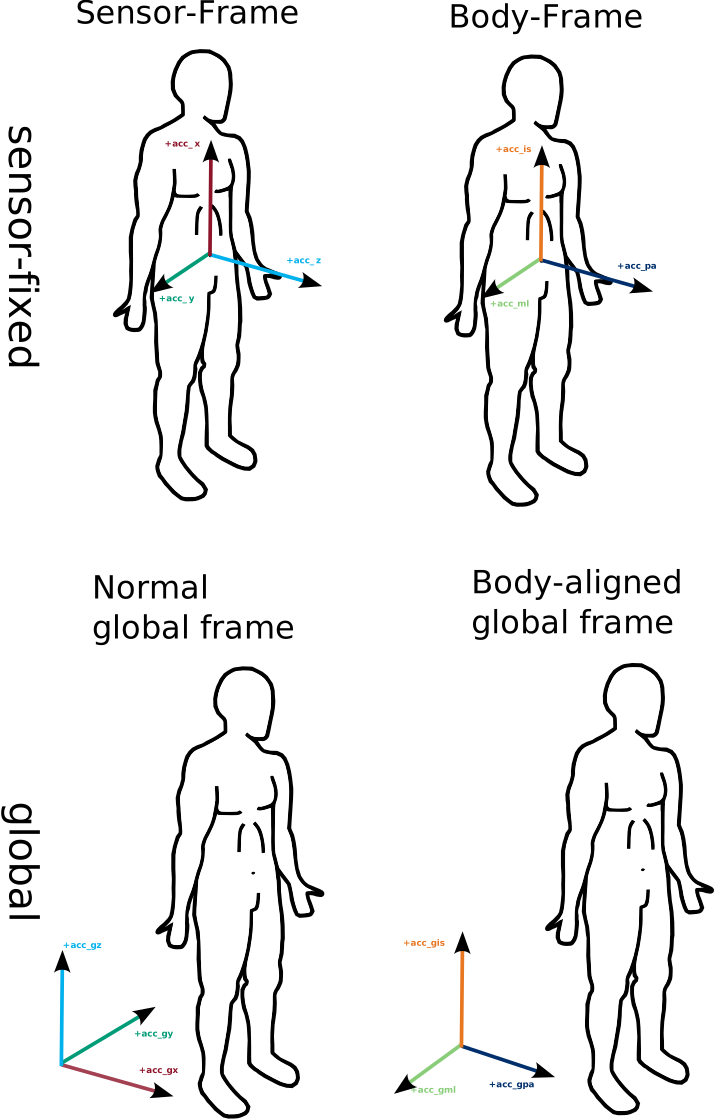
Overview over all 4 coordinate systems. Details below.#

Available transformation functions between the different coordinate systems.
To transform between sensor-fixed and global frames, you always need the orientation information.
This is usually provided by the orientation estimation algorithms.
The orientation estimation algorithms in mobgap support both sensor frame or body frame data as input.
You can then either use the orientation_object_ output and provide it to transform_to_global_frame or use the
rotated_data_ output that is already transformed to the global frame.
In both cases, input data in the sensor frame will lead to output in the normal global frame and input data in the body
frame will lead to output in the body-aligned global frame.
More details below.#
Sensor Frame#
The sensor frame is defined by the axis x, y, z of the sensor. We expect these axis directions to follow the directions of the MM+ sensor of McRoberts (when worn correctly), which is the primary sensor used in the mobilise-d project. This assumes that the sensor (if attached correctly) has the x-axis pointing upwards, the y-axis pointing to the right and the z-axis pointing forward.
To use all functions and algorithms in mobgap, you need to make sure that your data follows the same conventions. This means, you likely need to define a rotation matrix that transforms your data into the expected coordinate system. This transformation is usually derived based on the known mounting orientation of your sensor. Have a look at the sections 3 and 4 in this guide in gaitmap for more information on how to do this.
If you don’t have any information about the mounting orientation of your sensor, you can try to estimate it based on the sensor data. The upwards axis could for example be identified using gravity and forward/backward axis can be identified using PCA with some additional assumptions. You can try to use the automatic alignment function (TODO: Under development in #112) to align the sensor data to the body frame on a gait sequence level. Depending on the measurement setup, other constrains might be available to further refine the alignment. In all cases, manual inspection of the data is recommended to ensure that the alignment is correct.
Data that is in the sensor frame is simply named by the axis postfix _x, _y, and _z.
So the imu-data pandas Dataframe has the axes ["acc_x", "acc_y", "acc_z", "gyr_x", "gyr_y", "gyr_z"].
The sensor frame is used whenever, we need to perform rotational mathc (i.e. rotations) or when we can not assume that the orientation of the sensor is probably aligned with the body frame. However, when ever possible we work in the body frame to avoid confusion about which axis points in which direction.
Body Frame#
The body frame is defined by the axis IS (inferior-superior), PA (posterior-anterior), ML (medial-lateral) and is simply a renaming of the sensor frame axis. The figure above shows the expected direction of the body frame axis. The naming of the axis/conversion of the sensor frame is as follows: - x -> IS (inferior-superior) - y -> ML (medial-lateral) - z -> PA (posterior-anterior)
In code, this transformation can be done by the to_body_frame function.
This will return a dataframe with renamed axis and the same index as the input data.
Note, that this will only work, if your data is already correctly aligned with the sensor frame!
If you don’t have this yet, go back to the previous section to understand how to transform your data into the expected
sensor frame.
Most algorithms in mobgap expect the data to be in the body frame, so that they can easily work on the “upwards” or “forward” axis. Algorithms that would work in both the sensor and body frame, will usually accept both.
Global coordinate system#
In addition to the body frame, we also define a global coordinate system. This coordinate system is fixed in space and does not move with the sensor or the body.
To transform data from the body frame to the global frame, you usually need to apply an orientation estimation
algorithm.
These are usually sensor fusion algorithm that combine the data from the accelerometer and gyroscope
(and potentially magnetometer or other additional modalities) to estimate the orientation of the sensor in a fixed
global coordinate system.
In mobgap, we provide an implementation of the Madgwick algorithm for this
purpose, but other algorithms can be used as well.
The global frame definition follows the commonly used axis definitions used in many sensor fusion algorithms:
gz -> upwards (i.e. gravity aligned)
gy -> left (i.e. extracted from the sensor orientation at t=0, note that this is the negative direction of the sensor y-axis/ML axis)
gx -> forward (i.e. the direction of movement extracted from the sensor orientation at t=0)
By following the most common definitions here, we hope to make it easier to use other sensor fusion algorithms with mobgap. However, as the axis definitions in the global frame are not directly defined by the axis in the sensor frame at t=0, some care should be taken when using other sensor fusion algorithms.
The initial sensor orientation in the global coordinate system should be set to the neutral orientation of the sensor frame:
import numpy as np

# Initial orientation of the sensor in the global coordinate system
R = np.array([[0, 0, 1],
              [0, -1, 0],
              [1, 0, 0]])
The quaternion values of this rotation matrix are [\sqrt{2}/2, 0, \sqrt{2}/2, 0] (in a (x, y, z, w) convention).
This value as scipy rotation object is available mobgap package as mobgap.consts.INITIAL_MOBILISED_ORIENTATION and
should be used as the initial orientation for any sensor fusion algorithm.
When working with IMU data projected into the global frame, you should always be aware that the axis definitions are
different from the sensor frame.
However, that makes it quite inconvenient to work with the data.
In particular for algorithm like TdElgohary that can either be used in a sensor-fixed or
global frame, and needs the axis pointing “upwards” in both cases.
Therefore, we introduce the body-aligned global frame.
Body-aligned global frame#
The body-aligned global frame is defined by the axis GIS (global inferior-superior), GPA (global posterior-anterior), GML (global medial-lateral) and is fixed in space like the global frame. However, the axis are defined in terms of the body frame axis. This allows to easily pick, for example, the axis that points “upwards” without remembering the global frame convention.
To transform between the global and body-aligned global frame, you can use the to_body_frame
function.
Further, to make the common usecase of transferring body-frame data to the body-aligned global frame easier, the
orientation estimation algorithms like the Madgwick algorithm allow to use
body-frame data (i.e., acc_ic, acc_pa, …) as input and return the data (self.rotated_data_) in the body-aligned
global frame, when body-frame input is detected.
Under the hood, this uses transform_to_global_frame that takes the orientation
estimation from sensor to normal global frame as input and correctly applies it to either sensor frame or body frame
data (see graphic above for more details).